Test Report

Testing Scope

The scope of testing is to verify fitment to the specification from the perspective of

  • Functionality

  • Deployability

  • Configurability

  • Customizability

Verification is performed not only from the end user perspective but also from the System Integrator (SI) point of view. Hence Configurability and Extensibility of the software is also assessed. This ensures the readiness of software for use in multiple countries.

The Inji testing scope revolves around the following flows:\

  • Biometric unlock

  • Passcodes unlock

  • VC download via MOSIP

  • VC download via e-signet

  • VC downloads via Sunbird

  • Pinning a VC

  • Normal VC sharing with VID

  • Deleting VC

  • Face Auth on Resident's phone with VID

  • Multi language support

  • Credential registry

  • Backup and restore

  • Wallet binding

  • Deep link navigation

  • OpenID4VP

  • QR code Login

  • Key Management

  • Credential Offer

  • SD JWT VC download

  • SVG VC

  • Logout

Test Approach

Persona-based approach has been adopted to perform the IV&V by simulating test scenarios that resemble real-time implementation.

A Persona is a fictional character/user profile created to represent a user type that might use a product/or a service in a similar way. Persona-based testing is a software testing technique that puts software testers in the customer's shoes, assesses their needs from the software, and thereby determines use cases/scenarios that the customers will execute. The persona's needs may be addressed through any of the following.

  • Functionality

  • Deployability

  • Configurability

  • Customizability

The verification methods may differ based on how the need was addressed.

Verified configuration

Verification is performed on various configurations as mentioned below

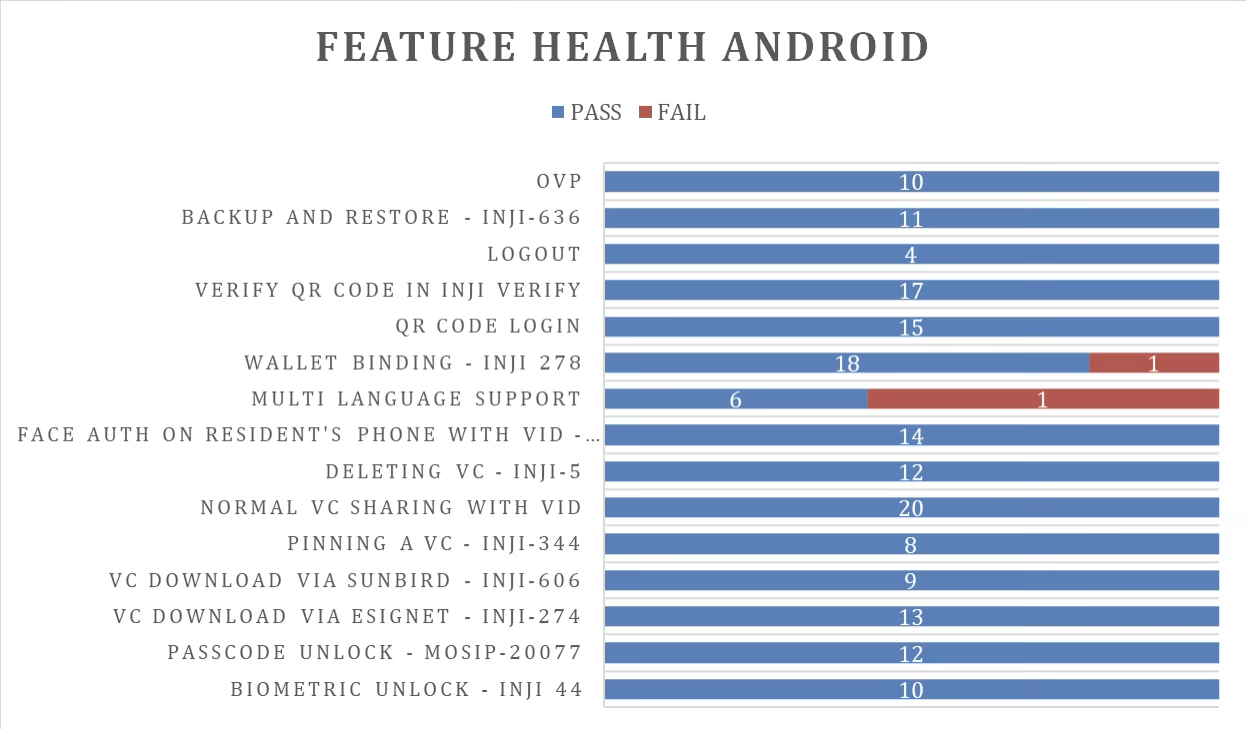
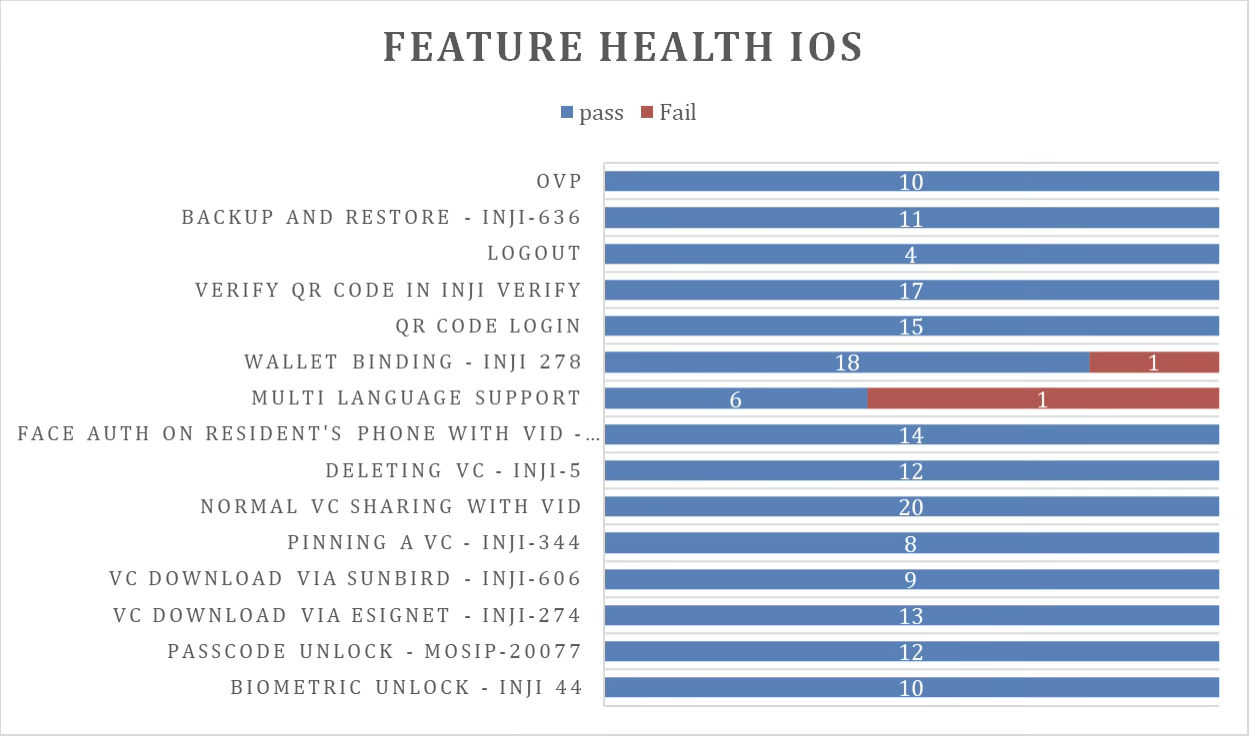
  • Default configuration - with 1 Lang • Feature Health

On Android Device:

On iOS Device:

Test execution statistics

Functional test results by modules

Below are the test metrics by performing functional testing using mock MDS and mock ABIS. The process followed was black box testing which based its test cases on the specifications of the software component under test. The functional test was performed in combination with individual module testing as well as integration testing. Test data were prepared in line with the user stories. Expected results were monitored by examining the user interface. The coverage includes GUI testing, System testing, End-To-End flows across multiple languages and configurations. The testing cycle included the simulation of multiple identity schema and respective UI schema configurations.

Total

Passed

Failed

Skipped (N/A)

4068

3659

409

0

Test Rate: 100%  Pass Rate: 89.94%\

Here is the detailed breakdown of metrics for each module:

Platform

Test Case Type

Count

On Android Device

Total

2118

Passed

1918

Failed

200

Skipped (N/A)

0

On iOS Device

Total

1950

Passed

1741

Failed

209

Skipped (N/A)

0

API test rig results:

Below are the test metrics for Mimoto API Test rig:

Total

Passed

Failed

Known Issue / Ignored

316

279

0

KI-4 and Ignored-33

Test Rate: 88%  Pass Rate: 100%

VC Verifier Library result:

Below are the test metrics for VC Verifier:

Total

Passed

Failed

Known Issue / Ignored

122

85

37

0

Test Rate: 100%  Pass Rate: 69.67%\

Testing with various device combinations

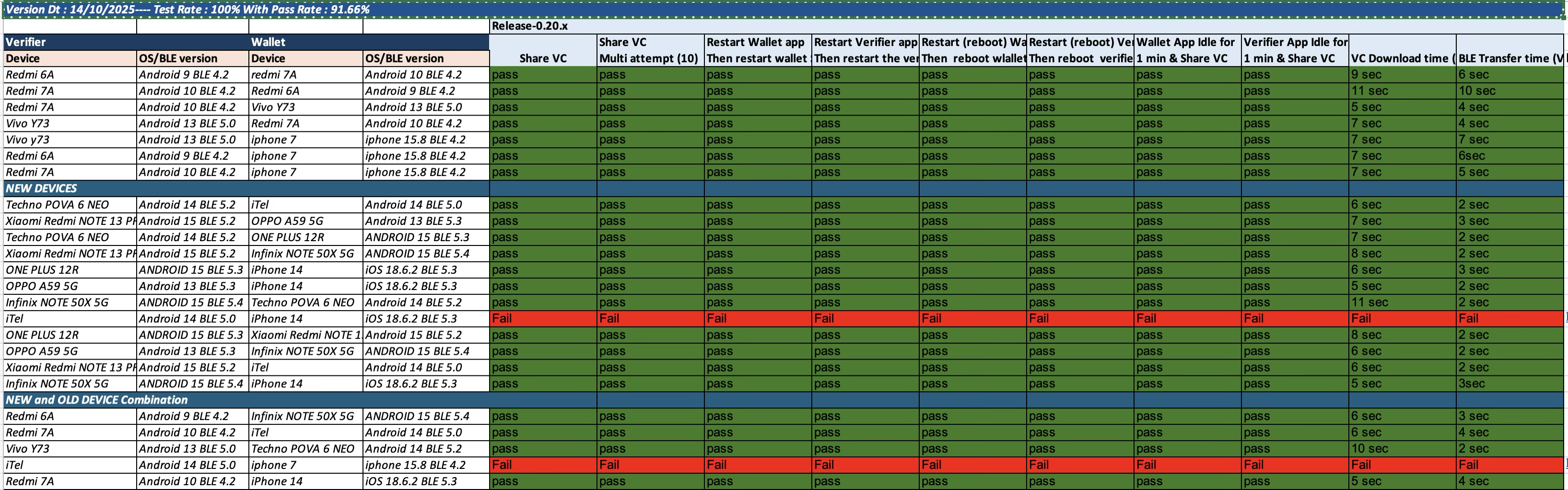
Below are the test metrics for performing the VC Sharing functionality on various device combinations

Total

Passed

Failed

Skipped

240

220

20

0

Test Rate: 100% With Pass Rate: 91.66%

Device and Component Details:

Devices Used For Testing

Vivo Y73 with Android 13 BLE 5.0

SS Galaxy A03 core with Android 11 BLE 4.2

iPhone 11 with iOS 18.3.2 BLE 5.0

iPhone 7 with iphone 15.8 BLE 4.2

Redmi 7A Android 10 BLE 4.2

Redmi 6A Android 9 BLE 4.2

Techno POVA 6 NEO - Android 14 BLE 5.0

iTel - Android 14 BLE 5.0

iPhone 14 - iOS 18.6.2 BLE 5.3

OPPO A59 5G - Android 13 BLE 5.3

ONE PLUS 12R - ANDROID 15 BLE 5.3

Xiaomi RedMi NOTE 13 PRO - Android 15 BLE 5.2

Infinix NOTE 50X 5G - ANDROID 15 BLE 5.4

iPhone 13 - iOS 18.6.2 BLE 5.0

\

Tested with Inji components qa-inji1

mosipqa/inji-verify-service:0.15.x

mosipqa/inji-verify-ui:0.15.x

mosipqa/inji-certify-with-plugins:0.12.x

mosipqa/apitest-mimoto:0.19.x

mosipqa/mimoto:develop

mosipqa/inji-web:develop

Tested with components - Released env

mosipid/mimoto:0.19.0

mosipid/apitest-mimoto:0.19.0

mosipid/inji-certify-with-plugins:0.12.1

mosipid/esignet-with-plugins:1.6.2

mosipid/authentication-service:1.2.1.0

mosipid/authentication-internal-service:1.2.1.0

mosipid/authentication-otp-service:1.2.1.0

mosipid/kernel-notification-service:1.2.0.1

mosipid/registration-processor-stage-group-1:1.2.1.1

Detailed Test Metrics

Below are the detailed test metrics by performing manual testing. The project metrics are derived from Defect density, Test coverage, Test execution coverage, test tracking and efficiency.

The various metrics that assist in test tracking and efficiency are as follows:

  • Passed Test Cases Coverage: It measures the percentage of passed test cases. (Number of tests passed / Total number of tests executed) x 100

  • Failed Test Case Coverage: It measures the percentage of all failed test cases. (Number of failed tests / Total number of test cases executed) x 100

Last updated

Was this helpful?