> For the complete documentation index, see [llms.txt](https://docs.inji.io/llms.txt). Markdown versions of documentation pages are available by appending `.md` to page URLs; this page is available as [Markdown](https://docs.inji.io/inji-wallet/inji-mobile/versions/version-0.19.0/test-report.md).
# Test Report
### Testing Scope
The scope of testing is to verify fitment to the specification from the perspective of
* Functionality
* Deployability
* Configurability
* Customizability
Verification is performed not only from the end user perspective but also from the System Integrator (SI) point of view. Hence, the Configurability and Extensibility of the software is also assessed. This ensures the readiness of software for use in multiple countries.
#### The Inji testing scope revolves around the following flows:
* Biometric unlock
* Passcodes unlock
* VC download via MOSIP
* VC download via e-signet
* VC downloads via Sunbird
* Pinning a VC
* Normal VC sharing with VID
* Deleting VC
* Face Auth on the Resident's phone with VID
* Multi-language support
* Credential registry
* Backup and restore
* Wallet binding
* Deep link navigation
* OpenID4VP
* QR code Login
* Key Management
* Credential Offer
* SD JWT VC download
* Logout
### Test Approach
A persona-based approach has been adopted to perform the IV\&V by simulating test scenarios that resemble real-time implementation.
A Persona is a fictional character/user profile created to represent a user type that might use a product/or a service in a similar way. Persona-based testing is a software testing technique that puts software testers in the customer's shoes, assesses their needs from the software and thereby determines use cases/scenarios that the customers will execute. The persona's needs may be addressed through any of the following.
* Functionality
* Deployability
* Configurability
* Customizability
The verification methods may differ based on how the need was addressed.
### Verified configuration
Verification is performed on various configurations as mentioned below
* Default configuration - with 1 Lang
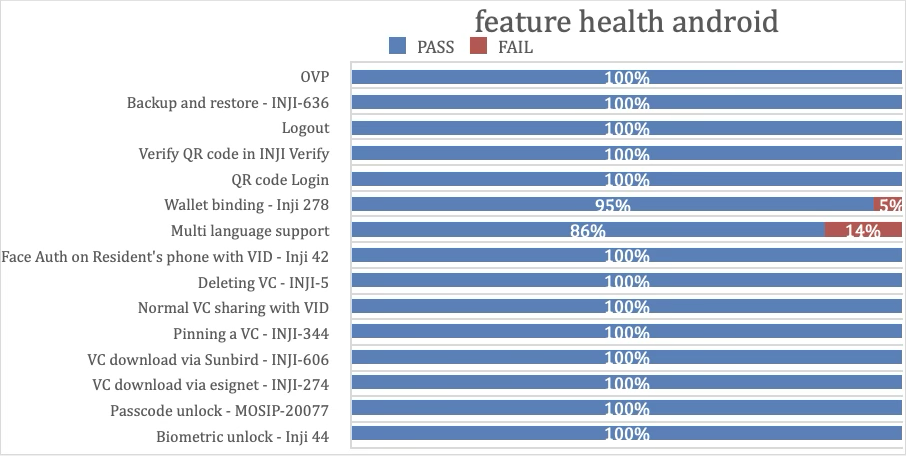
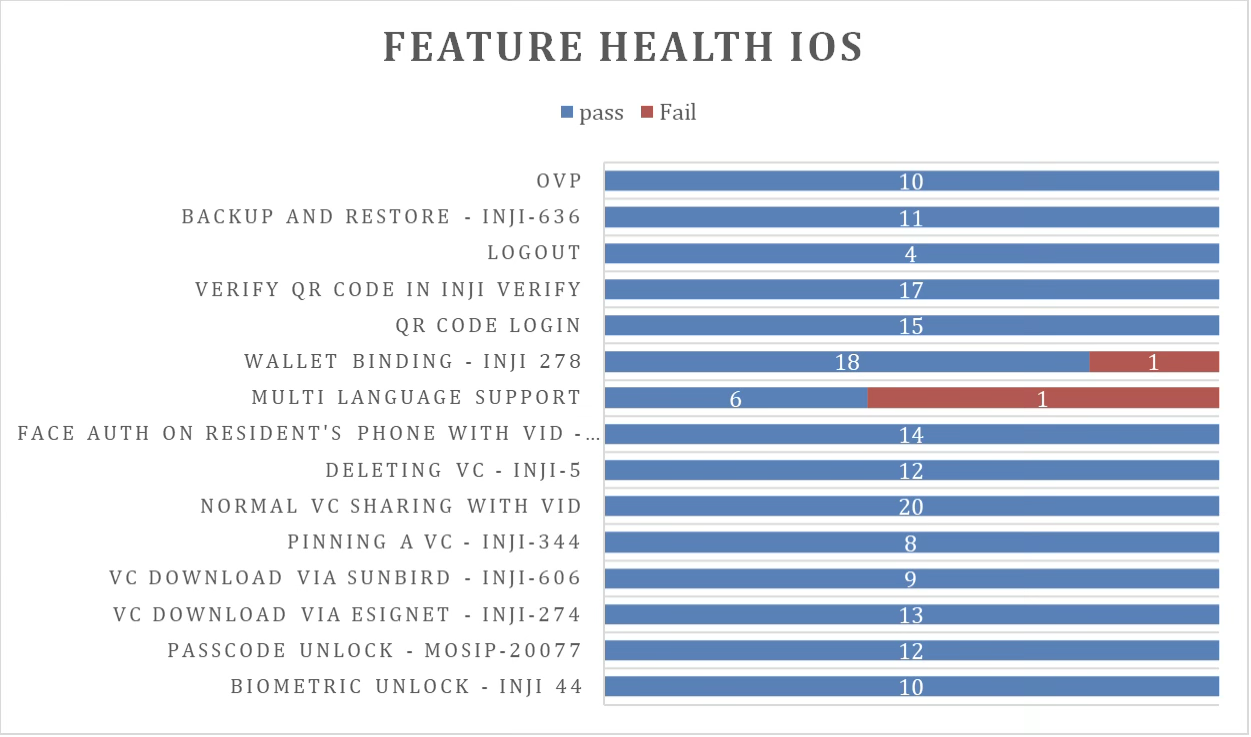
#### Feature Health
* **On Android Device:**
* **On iOS Device:**
### **Test execution statistics**
**Functional test results by modules**
Below are the test metrics for performing functional testing using mock MDS and mock ABIS. The process followed was black box testing, which was based on the specifications of the software component under test. The functional test was performed in combination with individual module testing as well as integration testing. Test data were prepared in line with the user stories. Expected results were monitored by examining the user interface. The coverage includes GUI testing, System testing, and end-to-end flows across multiple languages and configurations. The testing cycle included the simulation of multiple identity schemas and respective UI schema configurations.
| Total | Passed | Failed | Skipped (N/A) | Pass Rate |
| ----- | ------ | ------ | ------------- | --------- |
| 3900 | 3493 | 407 | 0 | 89% |
Test Rate: 100% execution coverage achieved.
**Here is the detailed breakdown of metrics for each module:**
| Platform | Total | Passed | Failed | Skipped (N/A) |
| -------------- | ----- | ------ | ------ | ------------- |
| Android Device | 2038 | 1839 | 199 | 0 |
| iOS Device | 1862 | 1654 | 208 | 0 |
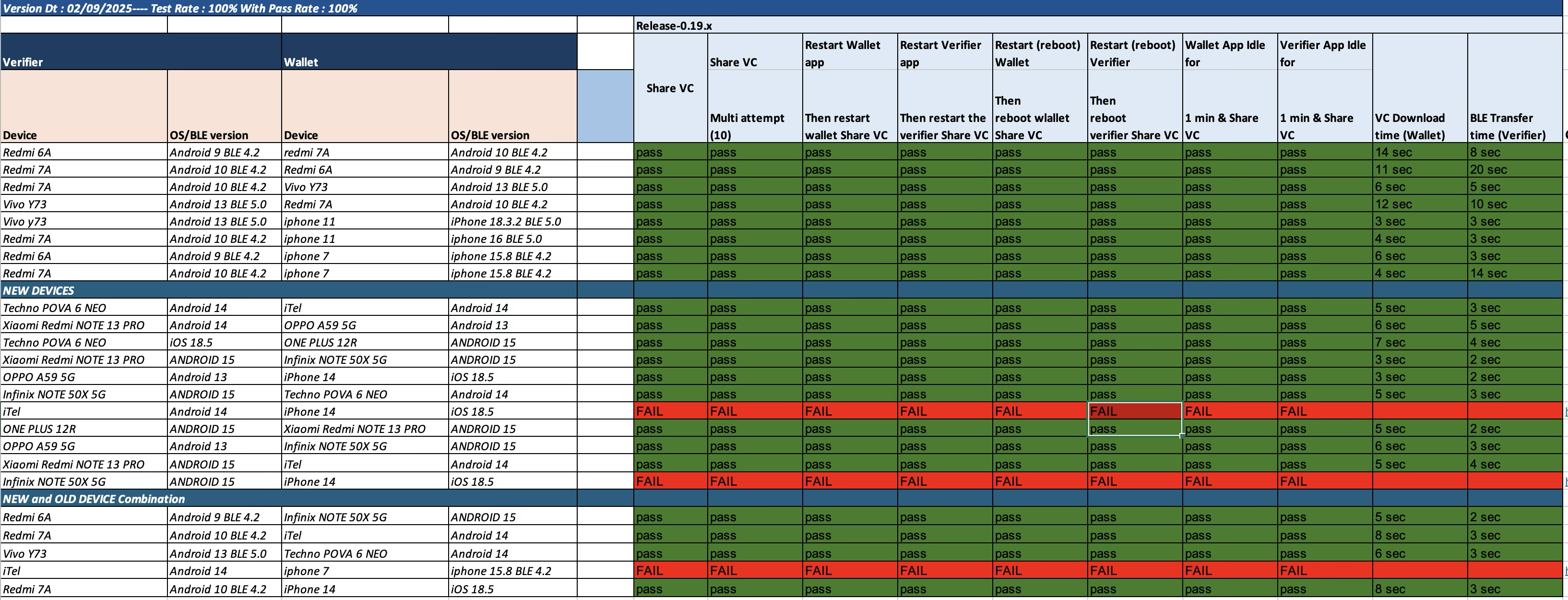
#### **Testing with various device combinations**
Below are the test metrics by performing VC Sharing functionality on various device combinations:
| Total | Passed | Failed | Skipped | Pass Rate |
| ----- | ------ | ------ | ------- | --------- |
| 240 | 210 | 30 | 0 | 87.5% |
**Test Rate:** 100% execution coverage achieved.
### Device and Component Details:
#### Tested with Inji Components (qa-inji1)
* mosipqa/inji-verify-service:0.14.x
* mosipqa/inji-verify-ui:0.14.x
* mosipqa/inji-certify-with-plugins:0.12.x
* mosipqa/apitest-mimoto:0.18.x
* mosipqa/mimoto:0.19.x
* mosipqa/inji-web:0.14.x
#### Tested with Components (Released env)
* mosipid/mimoto:0.18.1
* mosipid/apitest-mimoto:0.18.1
* mosipid/inji-verify-service:0.13.1
* mosipid/inji-verify-ui:0.13.1
* mosipid/apitest-inji-certify:0.11.0
* mosipid/inji-web:0.13.1
* mosipid/esignet-with-plugins:1.6.1
* mosipid/authentication-service:1.2.1.0
* mosipid/authentication-internal-service:1.2.1.0
* mosipid/authentication-otp-service:1.2.1.0
* mosipid/kernel-notification-service:1.2.0.1
* mosipid/registration-processor-stage-group-1:1.2.1.1
#### Devices Used for Testing
* Vivo Y73 with Android 13, BLE 5.0
* Samsung Galaxy A03 Core with Android 11, BLE 4.2
* iPhone 11 with iOS 18.3.2, BLE 5.0
* iPhone 7 with iOS 15.8, BLE 4.2
* Redmi 7A with Android 10, BLE 4.2
* Redmi 6A with Android 9, BLE 4.2
* Techno POVA 6 NEO – Android 14
* iTel – Android 14
* iPhone 14 – iOS 18.5
* OPPO A59 5G – Android 15
* ONE PLUS 12R – Android 15
* Xiaomi RedMi NOTE 13 PRO – Android 15
* Infinix NOTE 50X 5G – Android 15
* iPhone 13 – iOS 18.5
### Detailed Test Metrics
Below are the detailed test metrics from performing manual testing. The project metrics are derived from Defect density, Test coverage, Test execution coverage, test tracking and efficiency.
The various metrics that assist in test tracking and efficiency are as follows:
* Passed Test Cases Coverage: It measures the percentage of passed test cases. (Number of tests passed / Total number of tests executed) x 100
* Failed Test Case Coverage: It measures the percentage of all failed test cases. (Number of failed tests / Total number of test cases executed) x 100
{% hint style="success" %}
**Github link for the detailed report is** [**here**](https://github.com/mosip/test-management/tree/master/inji/0.19.0)
{% endhint %}
---
# Agent Instructions
This documentation is published with GitBook. GitBook is the documentation platform designed so that both humans and AI agents can read, navigate, and reason over technical content effectively. Learn more at gitbook.com.
## Querying This Documentation
If you need additional information that is not directly available in this page, you can query the documentation by asking a question.
Perform an HTTP GET request on the following URL with the `ask` and `goal` query parameters:
```
GET https://docs.inji.io/inji-wallet/inji-mobile/versions/version-0.19.0/test-report.md?ask=&goal=
```
`ask` is the immediate question: it should be specific, self-contained, and written in natural language.
`goal` is what the user is ultimately trying to achieve, the reason they need the answer. Sharing it helps GitBook give you a better, more relevant answer. A goal is most helpful when it describes the outcome the user wants rather than restating the question. For example, with `ask=how do I create an API token`, a goal like `automate deployments from our CI pipeline` lets GitBook tailor the answer to that use case.
The response will contain a direct answer to the question and relevant excerpts and sources from the documentation.
Use this mechanism when the answer is not explicitly present in the current page, you need clarification or additional context, or you want to retrieve related documentation sections.