> For the complete documentation index, see [llms.txt](https://docs.inji.io/llms.txt). Markdown versions of documentation pages are available by appending `.md` to page URLs; this page is available as [Markdown](https://docs.inji.io/inji-wallet/inji-mobile/technical-overview/integration-guide/building-verifiable-credentials-wallet-with-inji-libraries/vci-client.md).
# OpenID4VCI Library (VCI Client)
## Verifiable Credentials Issuance (VCI Client)
VCI Client library enables carrying out the credential request from the consumer application (mobile wallet or web) and downloading the VC.
## Features:
* Request credentials from OID4VCI-compliant credential issuers
* Supports both the Verifiable Credential download flows defined in the OID4VCI specification:
* Issuer Initiated Flow (Credential Offer Flow).
* Wallet-initiated flow (Trusted Issuer Flow).
* Authorization server discovery for both download flows
* PKCE-compliant OAuth 2.0 Authorization Code flow (RFC 7636)
* PKCE session is managed internally by the library
* Well-defined exception handling with VCI-XXX error codes (see more on this)
* Support for multiple Credential formats:
* ldp\_vc
* mso\_mdoc
* vc+sd-jwt / dc+sd-jwt
* Presentation During Issuance (PDI) support for both download flows
> ⚠️ Consumer of this library is responsible for processing and rendering the credential after it is downloaded.
* Kotlin and Swift artifacts are available to integrate with the native mobile applications.
The section details the steps for integrating the Kotlin and Swift packages into the app.
## Kotlin package for vci-client:
### Repository
* inji-vci-client repo is [here](https://github.com/inji/inji-vci-client)
### Supported platforms
* Android (via aar)
* JVM (via jar)
### Installation
Snapshot builds are available [here](https://central.sonatype.com/artifact/io.inji/inji-vci-client-aar).
{% hint style="info" %}
Note: implementation "io.inji:inji-vci-client:0.7.0"
{% endhint %}
## iOS: Swift package for vci-client:
### Repository
* [inji-vci-client-ios-swift repository](https://github.com/inji/inji-vci-client-ios-swift/)
### Installation
Add VCIClient to your Swift Package Manager dependencies:
```shell
.package(url: "https://github.com/inji/inji-vci-client-ios", from: "0.7.0")
```
## APIs
The library provides the following APIs for credential issuance:
| Use Case | Method Name | Description |
| --------------------------------------- | ---------------------------------------- | --------------------------------------------------------------- |
| **Obtain Issuer Metadata** | `getIssuerMetadata()` | Retrieve issuer metadata from well-known endpoint |
| **Get Supported Credentials** | `getCredentialConfigurationsSupported()` | Get supported credential configurations from issuer |
| **Fetch Credential (Credential Offer)** | `fetchCredentialUsingCredentialOffer()` | Request credential using credential offer (Pre-Auth/Auth flows) |
| **Fetch Credential (Trusted Issuer)** | `fetchCredentialFromTrustedIssuer()` | Request credential from a trusted issuer (Auth flow) |
> **Note:** For detailed API documentation including parameters, return types, and usage examples, refer to the [Kotlin API Reference](https://github.com/inji/inji-vci-client/tree/master/kotlin#-api-overview) or [Swift implementation documentation](https://github.com/inji/inji-vci-client-ios-swift/tree/master/#-api-overview).
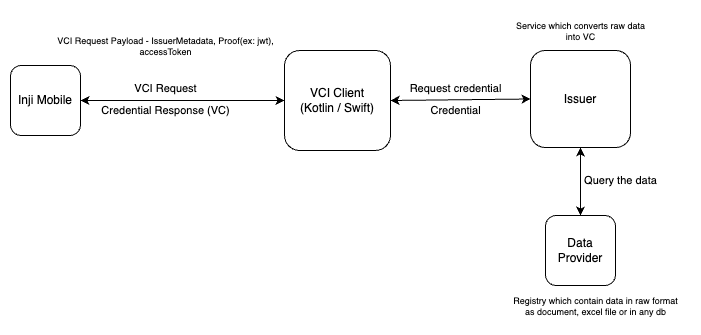
### VCI-Client and Inji Wallet integration:
The diagram below shows how Inji Wallet utilises the vci-client library.
---
# Agent Instructions
This documentation is published with GitBook. GitBook is the documentation platform designed so that both humans and AI agents can read, navigate, and reason over technical content effectively. Learn more at gitbook.com.
## Querying This Documentation
If you need additional information that is not directly available in this page, you can query the documentation by asking a question.
Perform an HTTP GET request on the following URL with the `ask` and `goal` query parameters:
```
GET https://docs.inji.io/inji-wallet/inji-mobile/technical-overview/integration-guide/building-verifiable-credentials-wallet-with-inji-libraries/vci-client.md?ask=&goal=
```
`ask` is the immediate question: it should be specific, self-contained, and written in natural language.
`goal` is what the user is ultimately trying to achieve, the reason they need the answer. Sharing it helps GitBook give you a better, more relevant answer. A goal is most helpful when it describes the outcome the user wants rather than restating the question. For example, with `ask=how do I create an API token`, a goal like `automate deployments from our CI pipeline` lets GitBook tailor the answer to that use case.
The response will contain a direct answer to the question and relevant excerpts and sources from the documentation.
Use this mechanism when the answer is not explicitly present in the current page, you need clarification or additional context, or you want to retrieve related documentation sections.