> For the complete documentation index, see [llms.txt](https://docs.inji.io/llms.txt). Markdown versions of documentation pages are available by appending `.md` to page URLs; this page is available as [Markdown](https://docs.inji.io/inji-certify/technical-overview/architecture.md).
# Architecture
Inji Certify is a platform designed to manage and facilitate the issuance of Verifiable Credentials (VCs). It features a modular architecture that supports both direct issuance and proxying of VCs from external sources. It interacts with external digital wallets via APIs.
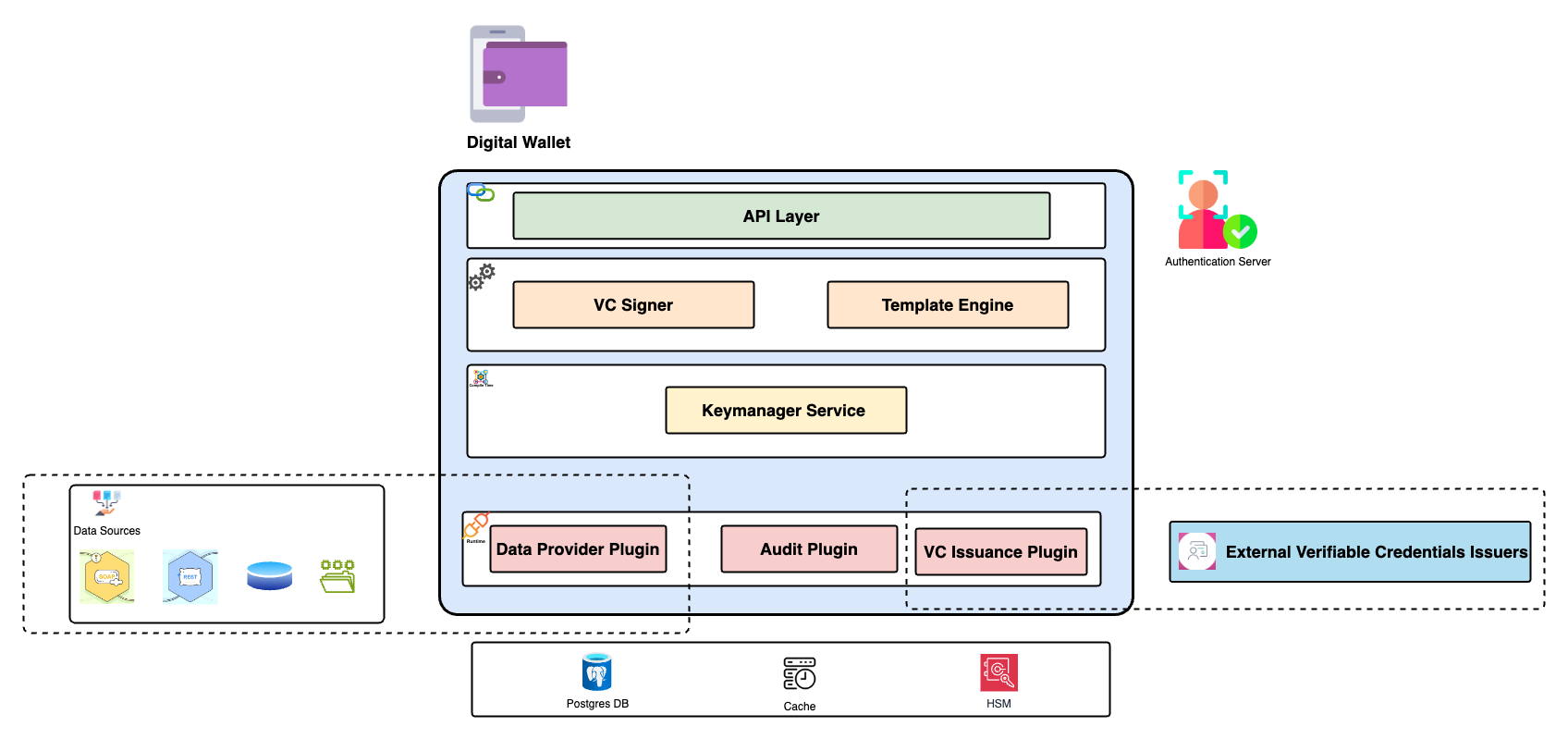
* This layered component diagram represents the architecture of the Inji Certify system.
* The diagram is organized into four distinct layers, each representing a different aspect of the system's functionality:
1. **API Layer**:
* This layer serves as the entry point for external interactions with the system.
* It exposes various APIs that allow clients to interact with the underlying services.
2. **VC Signer and Template Engine**:
* This layer is responsible for the creation and signing of Verifiable Credentials (VCs).
* The Template Engine component within this layer handles the generation of credential templates.
* The VC Signer component ensures that the credentials are properly signed and verifiable.
3. **Keymanager Service**:
* This layer manages cryptographic keys used for signing and verifying credentials.
* It ensures the secure storage and retrieval of keys, and handles key rotation and management tasks.
4. **Plugin interaction**:
* This foundational layer consists of three plugins that provide essential services to the upper layers:
* **Data Provider Plugins:** These plugins fetch relevant data from external sources or registries. They retrieve the necessary information and return it to Inji Certify as a JSON object. Inji Certify then utilizes this data to generate and issue the corresponding VCs..
* **Audit Plugin**: Tracks and logs actions within the system for auditing purposes.
* **VC Issuance Plugin**: Exposes API for VCI Issuance which internally connects with credential service and sends the Verifiable Credential (VC) issued by the service as a response.
Each layer builds upon the services provided by the layer below it, creating a modular and scalable architecture for the Inji Certify system.
---
# Agent Instructions
This documentation is published with GitBook. GitBook is the documentation platform designed so that both humans and AI agents can read, navigate, and reason over technical content effectively. Learn more at gitbook.com.
## Querying This Documentation
If you need additional information that is not directly available in this page, you can query the documentation by asking a question.
Perform an HTTP GET request on the following URL with the `ask` and `goal` query parameters:
```
GET https://docs.inji.io/inji-certify/technical-overview/architecture.md?ask=&goal=
```
`ask` is the immediate question: it should be specific, self-contained, and written in natural language.
`goal` is what the user is ultimately trying to achieve, the reason they need the answer. Sharing it helps GitBook give you a better, more relevant answer. A goal is most helpful when it describes the outcome the user wants rather than restating the question. For example, with `ask=how do I create an API token`, a goal like `automate deployments from our CI pipeline` lets GitBook tailor the answer to that use case.
The response will contain a direct answer to the question and relevant excerpts and sources from the documentation.
Use this mechanism when the answer is not explicitly present in the current page, you need clarification or additional context, or you want to retrieve related documentation sections.